
ASUS ROG NUC 16 Edition 20 Review: RTX 5090 in a 3-Liter Mini PC
Mini PCs keep getting more ridiculous, but this one is the point where compact hardware stops being cute and starts being genuinely outrageous. The ASUS ROG NUC 16 Edition 20 pairs an Intel Core Ultra 9 290HX Plus with a GeForce RTX 5090 Laptop GPU: inside a three-liter chassis with 20th-anniversary styling. At $5,999, the question isn’t whether it’s fast. It’s whether it’s worth it.
Short version: this is the best-performing mini PC we’ve ever tested, and it’s still not a value buy. Here’s everything, measured.
TL;DR: The 10-second verdict
| What it is | A 3-liter anniversary-edition mini PC with flagship laptop silicon |
| Who it’s for | Gamers/creators who want RTX 5090-class performance without a tower under the desk |
| The headline | Gaming that keeps up with full desktops, creator performance a whisker off a 4090 rig |
| The catch | $5,999, ~60W idle draw, confusing memory specs, uneven availability |
| Our take | Genuinely impressive engineering. Not a value buy, but nothing this small has any right to be this fast |
| Where To Buy (Affiliate Links) | Amazon · Later · JoyLink |
| Video Review | YouTube |
Hardware & Specs
| Component | Specification |
|---|---|
| CPU | Intel Core Ultra 9 290HX Plus |
| GPU | NVIDIA GeForce RTX 5090 Laptop: 24GB GDDR7, up to 175W sustained |
| Memory | Up to 128GB DDR5-6400 CSO-DIMM (marketing): spec sheet lists 64GB; our unit had 64GB (63GB usable) |
| Storage | 1× PCIe 5.0 M.2 2280 + 1× PCIe 4.0 M.2 2280: 2TB PCIe 5.0 SSD included |
| Networking | Intel Killer Wi-Fi 7 (BE1750x) · Bluetooth 5.4 · 2.5GbE (Realtek RTL8125D) |
| Rear I/O | Thunderbolt 4 Type-C (DP 2.1) · 4× USB 3.2 Gen 2 Type-A · 2× HDMI 2.1 FRL · 2× DisplayPort 2.1 · RJ45 · DC-in · Kensington |
| Front I/O | Power · 3.5mm combo audio · 1× USB-C 3.2 Gen 2 · 2× USB-A 3.2 Gen 2 |
| Cooling | 3× QuietFlow fans · dual vapor chamber · dedicated memory fan |
| Chassis | Semi-transparent 3L, gold accents, removable stand, toolless front access, 3.12 kg, 380W adapter |
ASUS claims the cooling design lifts CPU thermal capacity by 21% and lets the system dump roughly 300W of combined CPU+GPU heat. That number matters. This is a machine that looks quiet and innocent until you actually load it.
Design notes
- The 20th-anniversary styling (semi-transparent shell, gold accents, RGB light strip) makes this feel collector-grade. It’s the nicest-looking mini PC we’ve handled.
- The RGB is controllable in Armoury Crate… But honestly, the LEDs are too dim. We played with the brightness slider and could barely tell.
- One genuine gripe: no audio-out on the rear. A $6,000 flagship that funnels audio through the front 3.5mm jack is a weird omission.
Gaming Performance
Settings: MAX quality, ray tracing ON, DLSS Quality, no frame generation, averages of multiple runs, with 1% lows.
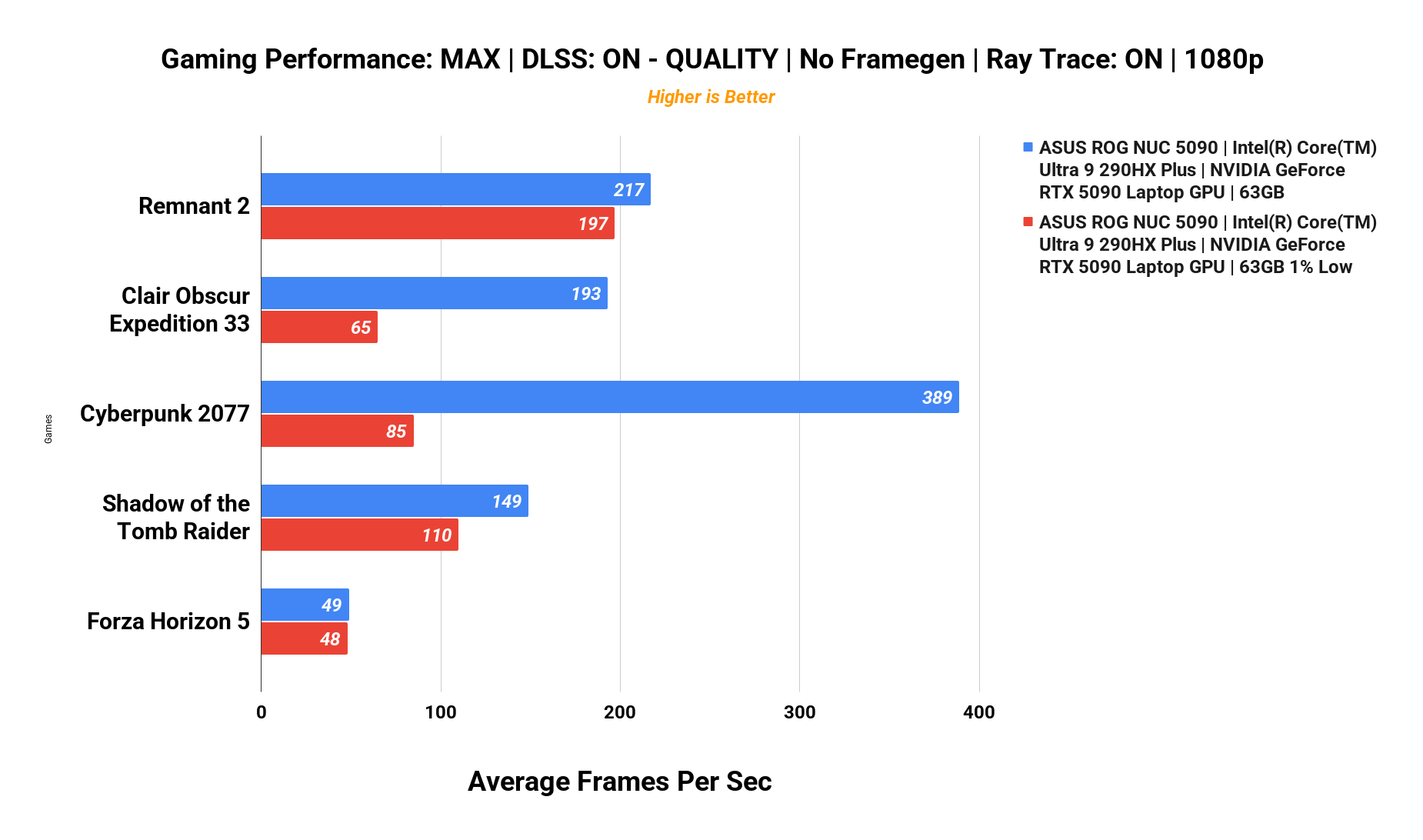
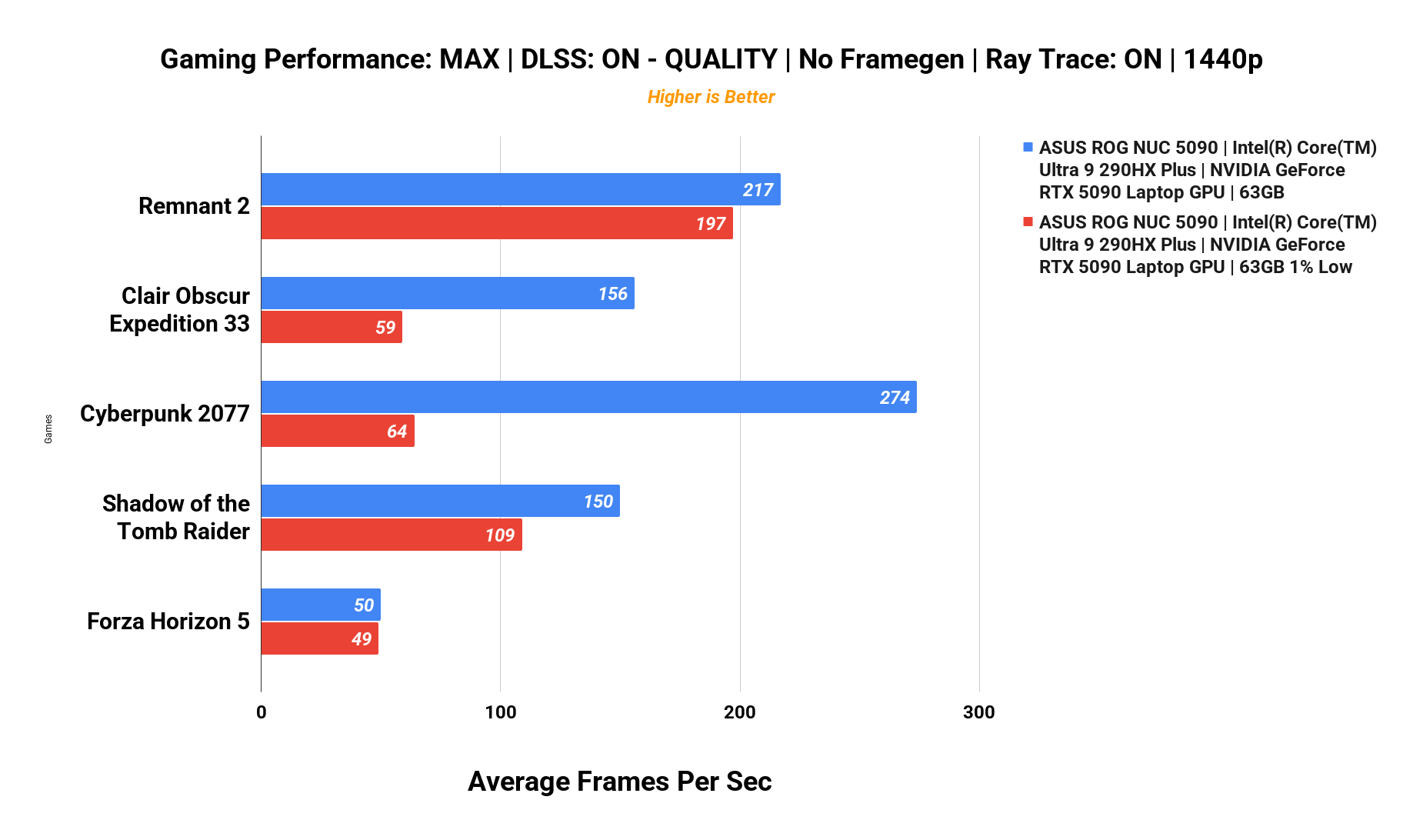
| Game (avg fps / 1% low) | 1080p | 1440p | UW 1440p |
|---|---|---|---|
| Cyberpunk 2077 | 389 / 85 | 274 / 64 | 221 / 51 |
| Remnant 2 | 217 / 197 | 217 / 197 | 217 / 197 |
| Clair Obscur: Expedition 33 | 193 / 65 | 156 / 59 | 136 / 64 |
| Shadow of the Tomb Raider | 149 | 150 / 109 | 149 |
| Forza Horizon 5 | ~50*** | 50 / 49*** | ~50*** |
That’s 389 fps in Cyberpunk 2077 at 1080p with ray tracing on, numbers that would’ve sounded absurd in a full-size tower a few years ago. This doesn’t feel like a mini PC struggling to keep up; it feels like a tiny desktop trying to get away with something.
***There seems to be a bug with Forza Horizon 5 when we were doing the testing. It doesn’t seem get any higher than 50 FPS no matter what settings we tried.***
Creator Workloads: DaVinci Resolve Studio
We rendered a 4-minute project on the YouTube preset, with and without 2× upscaling, plus a full PugetBench DaVinci Resolve Studio 20.3 run.
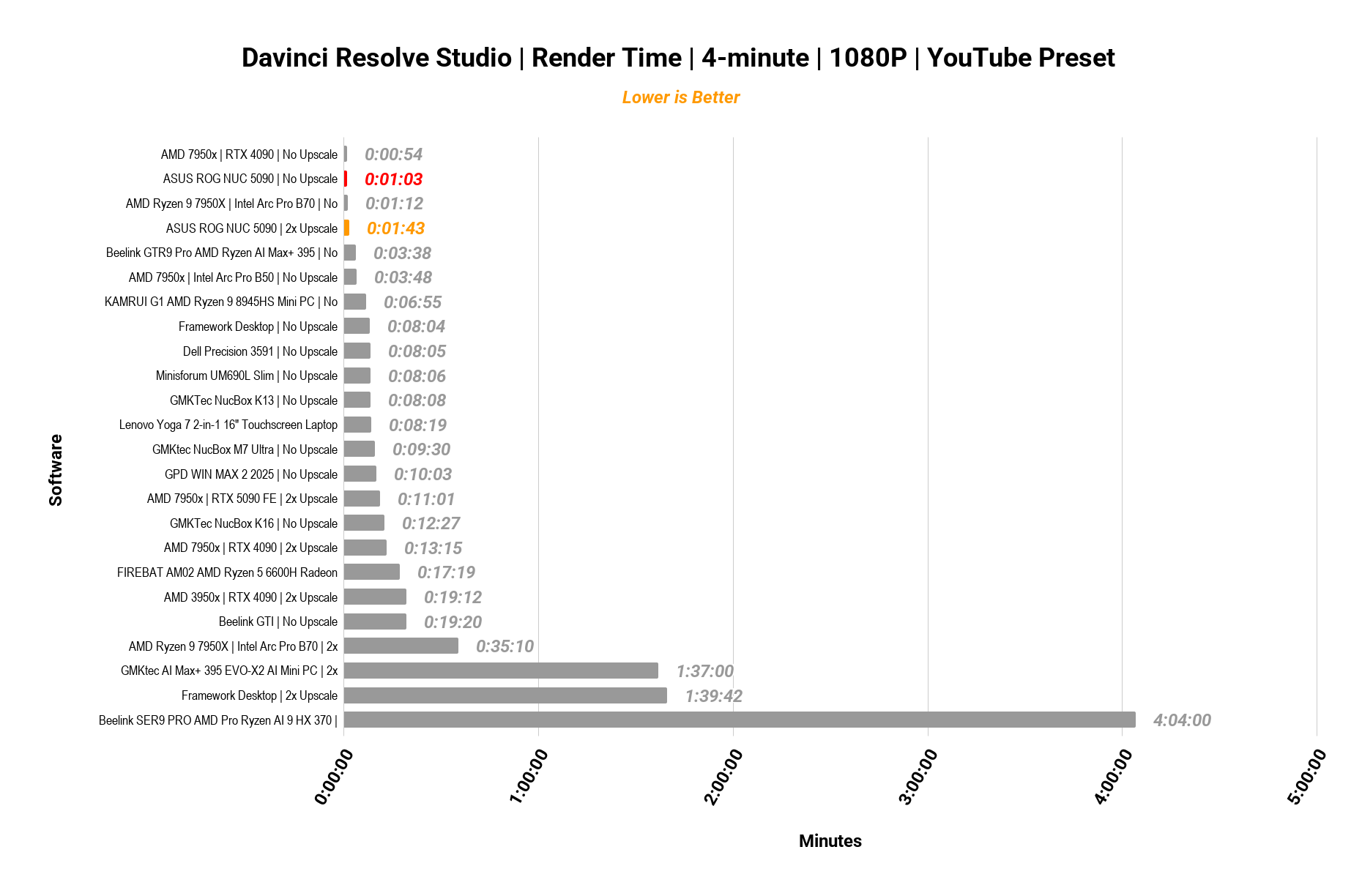
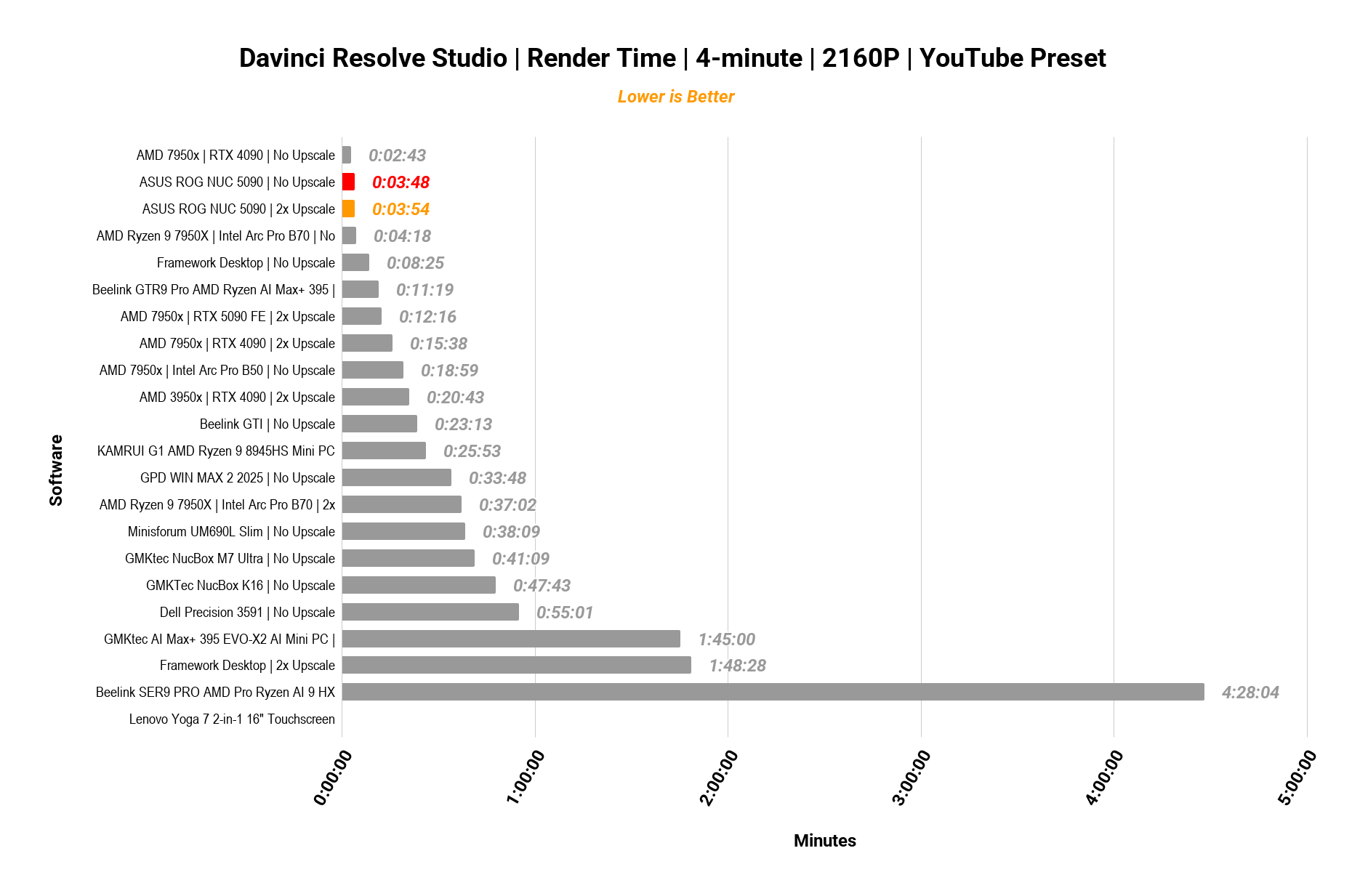
| Render time (4-min project) | ROG NUC 16 | 7950X + RTX 4090 (desktop) |
|---|---|---|
| 1080p, no upscale | 1:03 | 0:54 |
| 1080p, 2× upscale | 1:43 | : |
| 2160p, no upscale | 3:48 | 2:43 |
| 2160p, 2× upscale | 3:54 | : |
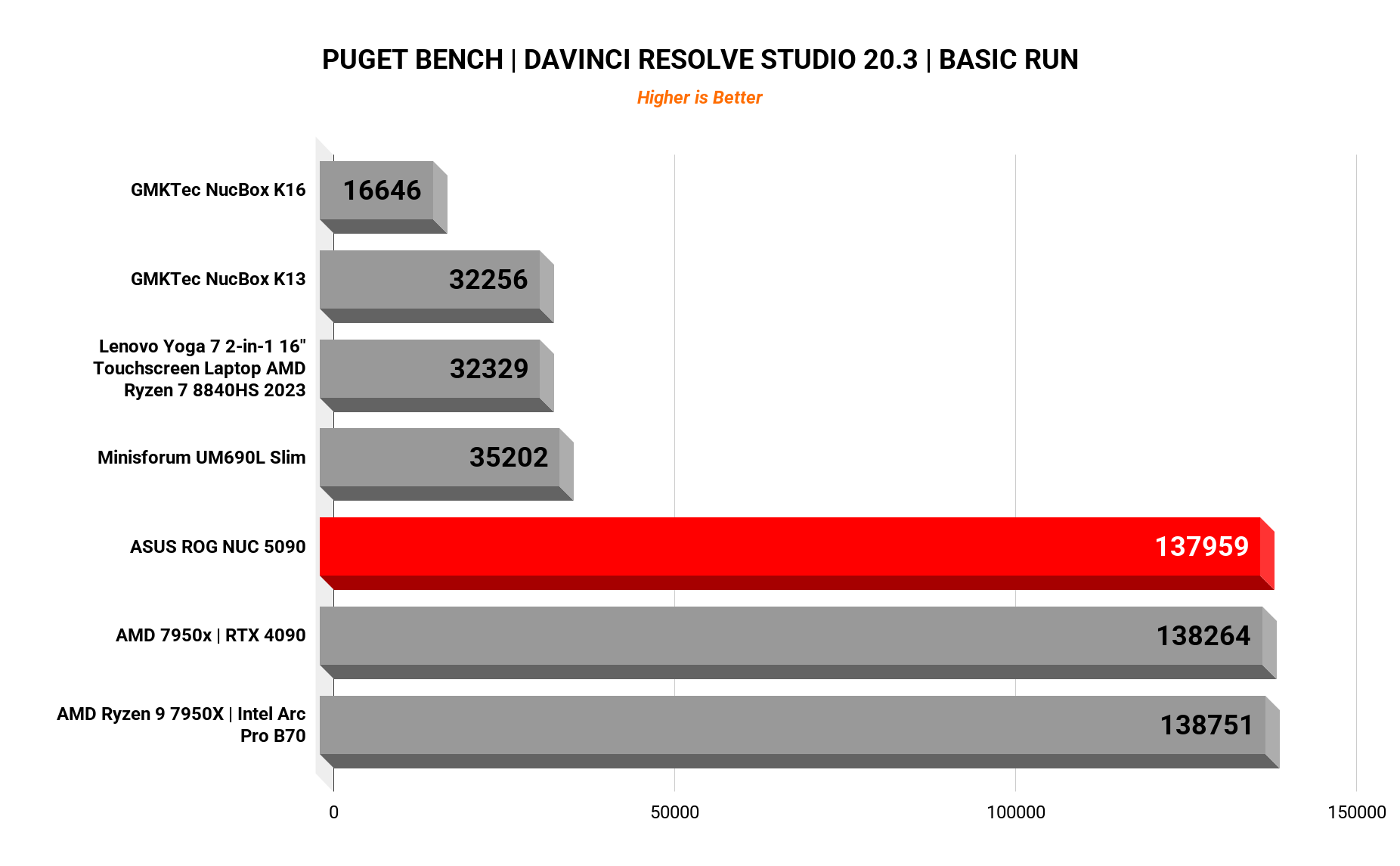
The PugetBench basic run scored 137,959: versus 138,264 for a desktop Ryzen 9 7950X + RTX 4090 and 138,751 for a 7950X + Arc Pro B70. A three-liter box sitting within ~0.6% of full-size 4090 desktops on a real editing workload is frankly ridiculous. Scrubbing 1080p and 4K timelines is stutter-free.
Local AI: LLMs & ComfyUI
This is where the 24GB of GDDR7 earns its keep. All tests at full context length.
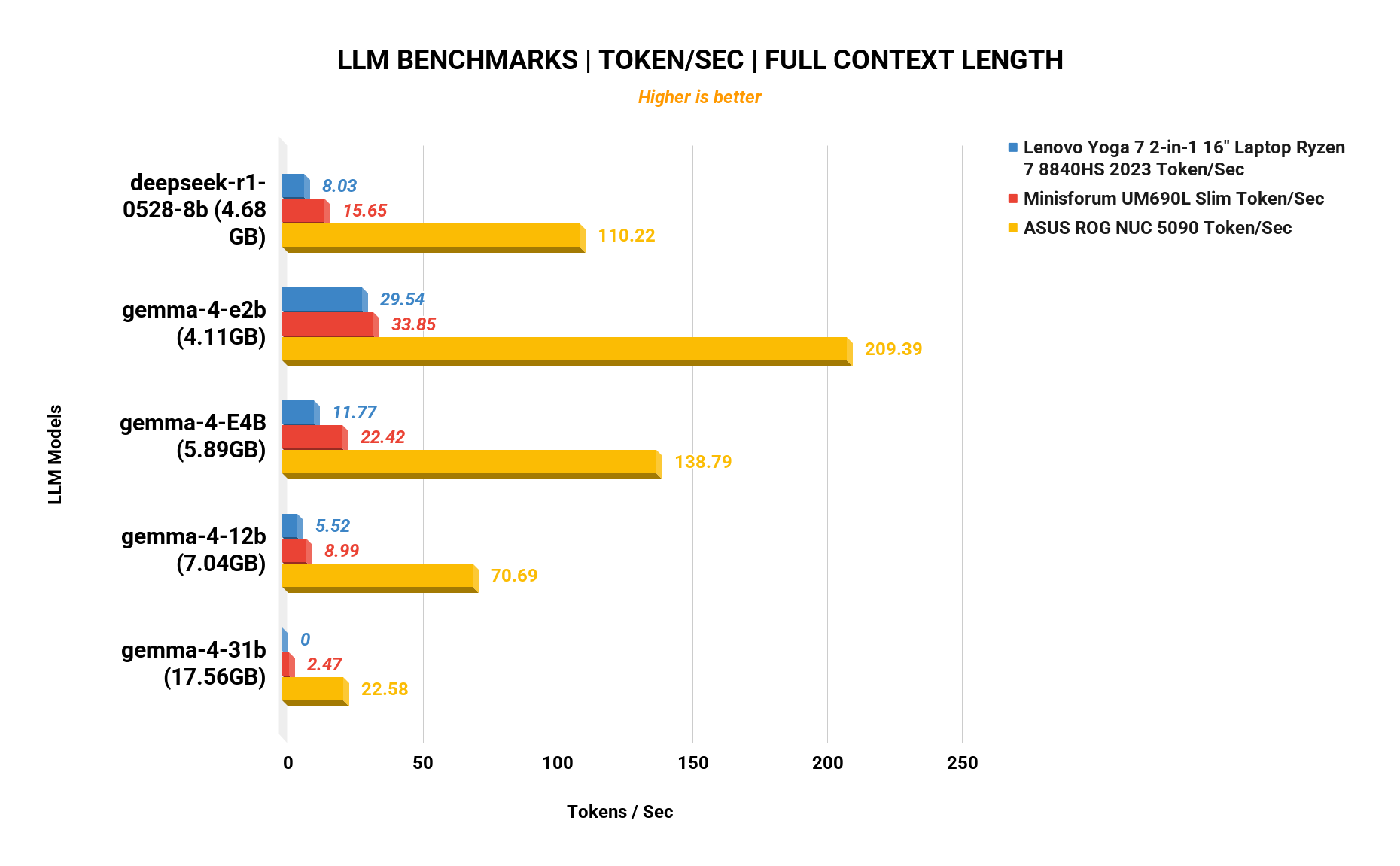
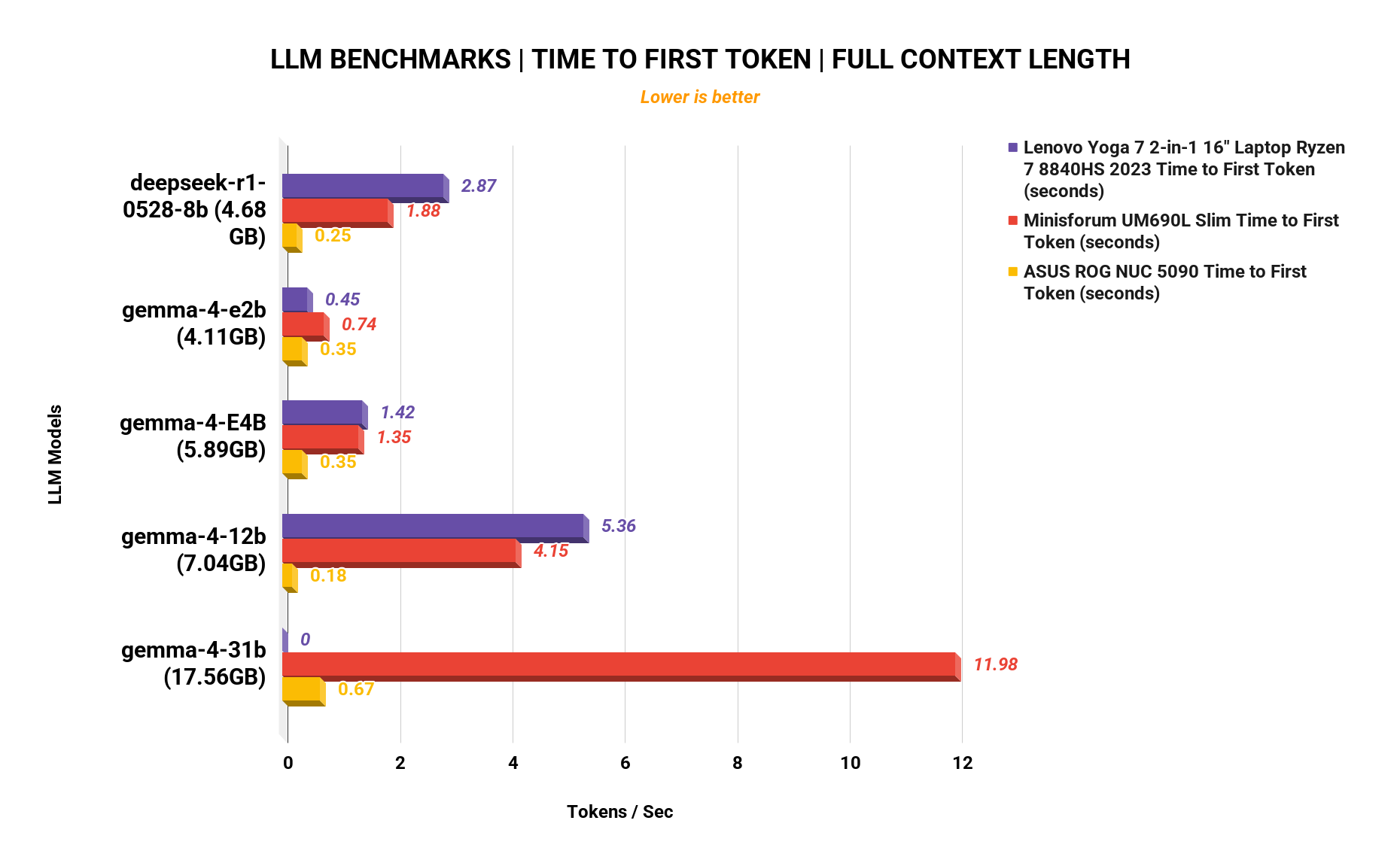
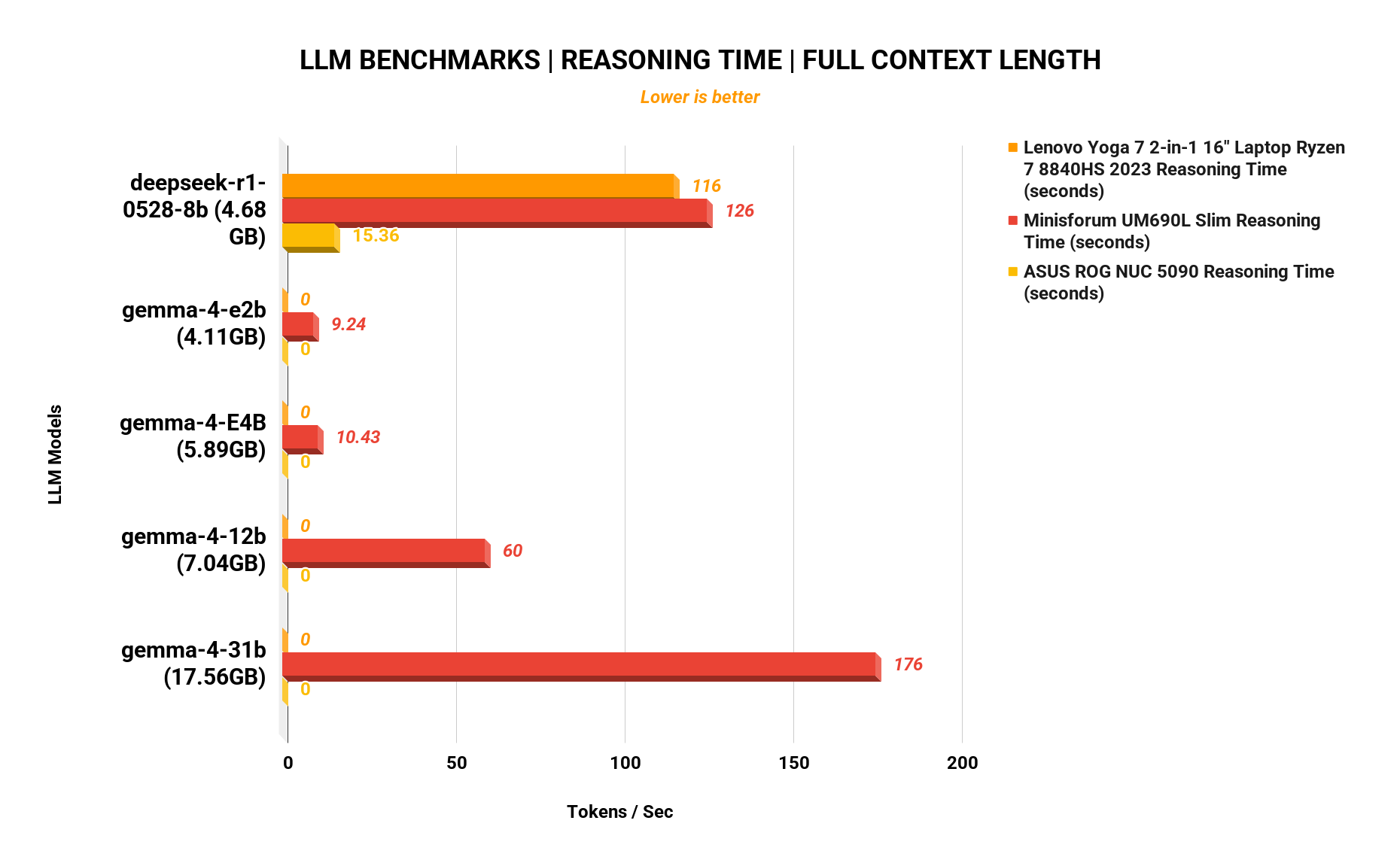
| Model | Tokens/sec (NUC) | vs UM690L Slim | vs Yoga 7 laptop |
|---|---|---|---|
| deepseek-r1-0528-8b | 110.2 | 15.7 | 8.0 |
| gemma-4-e2b | 209.4 | 33.9 | 29.5 |
| gemma-4-E4B | 138.8 | 22.4 | 11.8 |
| gemma-4-12b | 70.7 | 9.0 | 5.5 |
| gemma-4-31b | 22.6 | 2.5 | 0 |
Time to first token on deepseek-r1-0528-8b: 0.25s (vs 1.88s / 2.87s on the comparison systems). A full-context reasoning run that takes 116-126 seconds on typical premium laptops finished in 15.4 seconds here. That’s the difference between “local AI as a demo” and “local AI you’d actually use.”
ComfyUI image generation
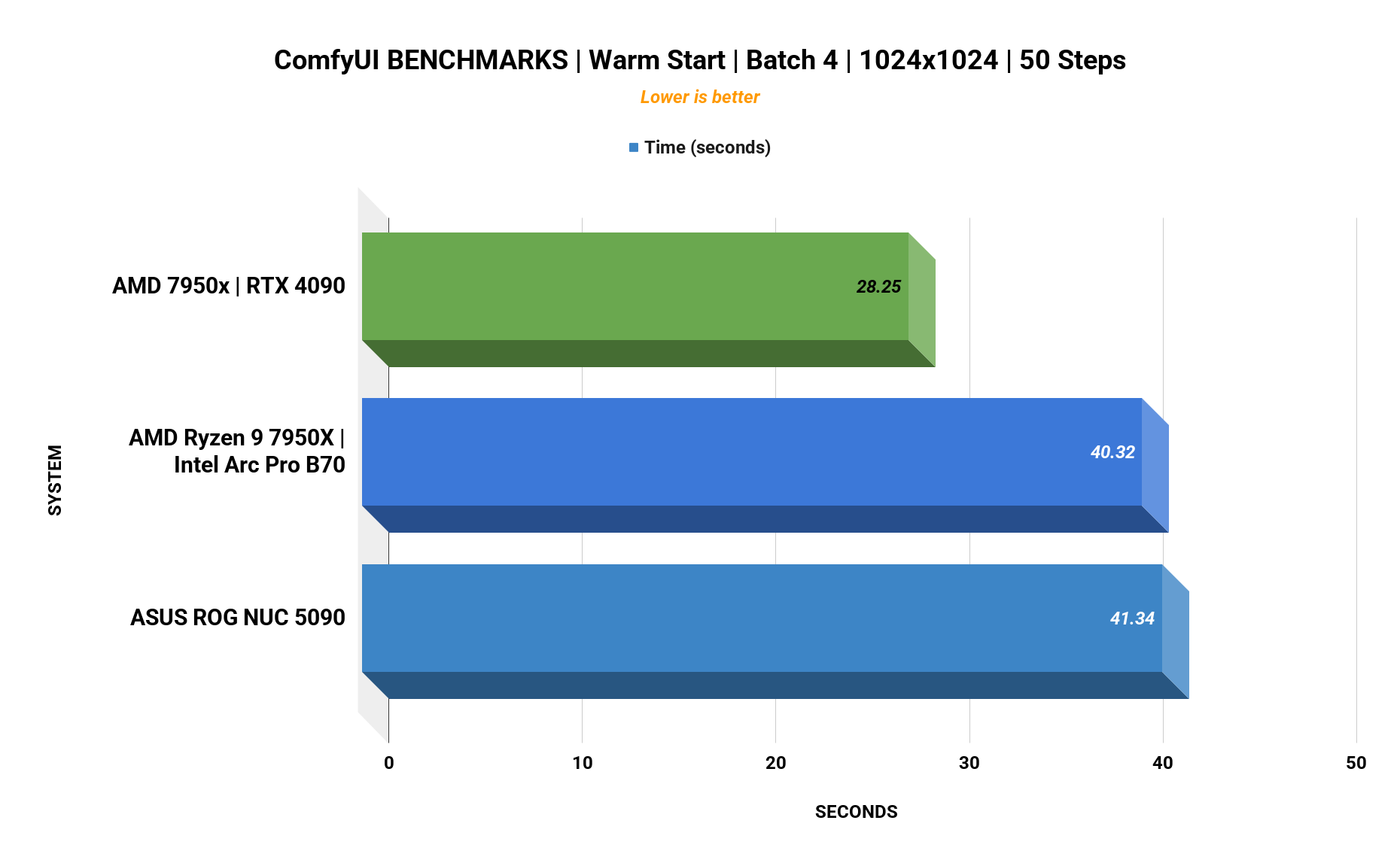
Warm-start batch of four 1024×1024 images at 50 steps:
| System | Time |
|---|---|
| Ryzen 9 7950X + RTX 4090 (desktop) | 28.25s |
| ROG NUC 16 (RTX 5090 Laptop) | 41.34s |
| Ryzen 9 7950X + Intel Arc Pro B70 (desktop) | 40.32s |
Breathing down the neck of an enterprise desktop Arc setup, in a box the size of a toaster.
CPU: Cinebench 2024
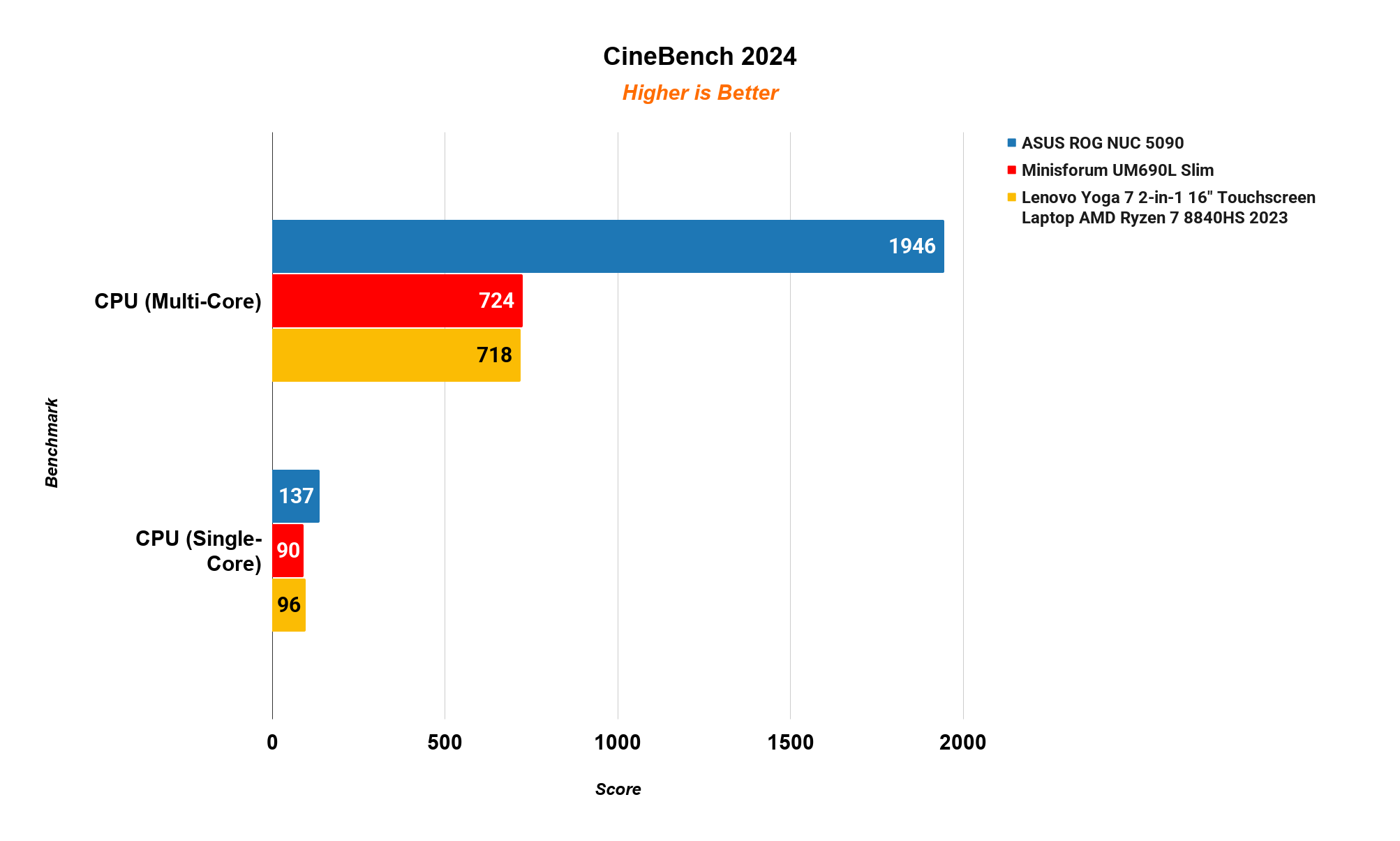
| Cinebench 2024 | Multi | Single |
|---|---|---|
| ROG NUC 16 (Ultra 9 290HX Plus) | 1,946 | 137 |
| Minisforum UM690L Slim | 724 | 90 |
| Lenovo Yoga 7 (Ryzen 7 8840HS) | 718 | 96 |
Nearly 2.7× the multi-threaded performance of premium laptops, packed into a chassis barely larger.
Power & Noise
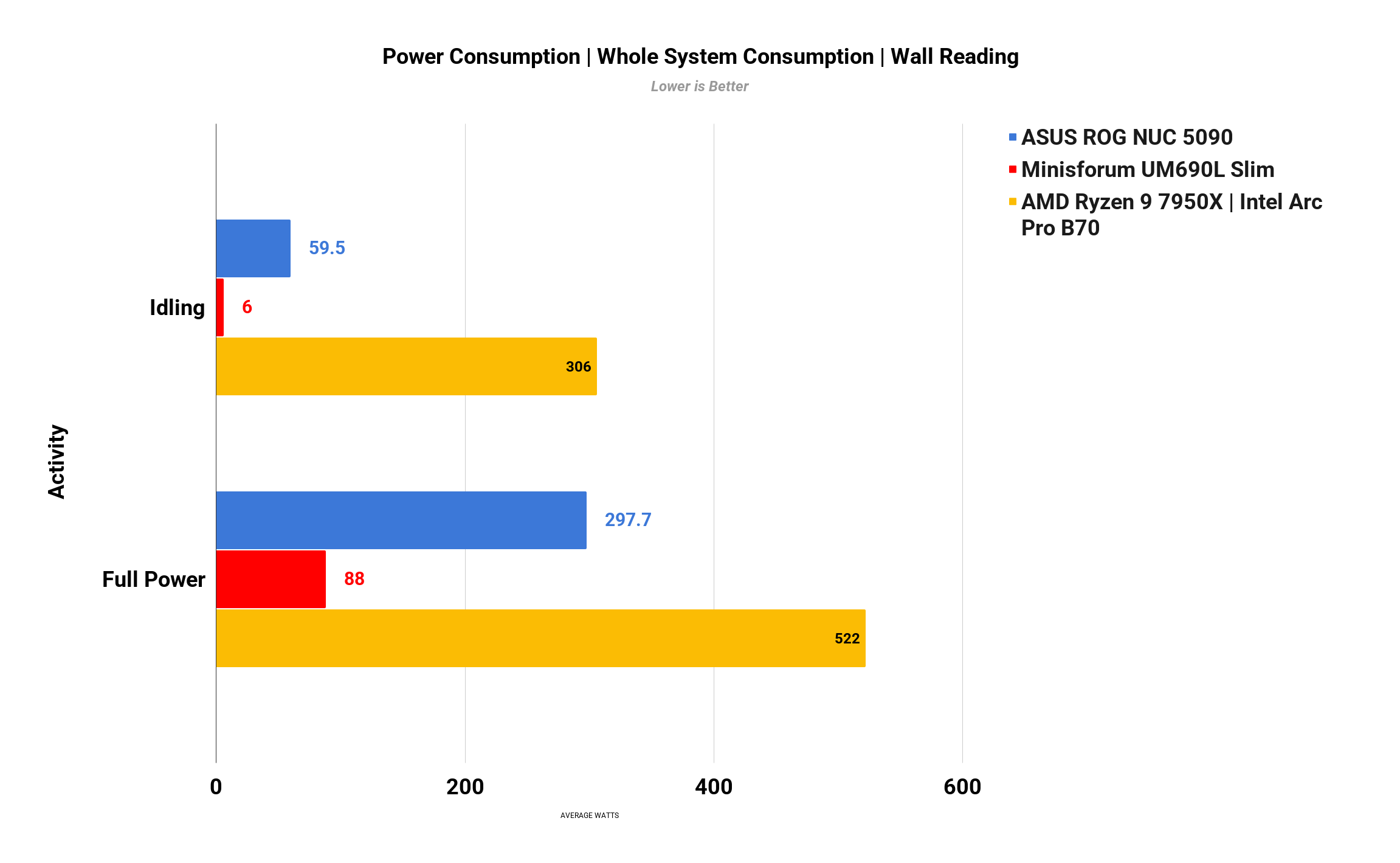
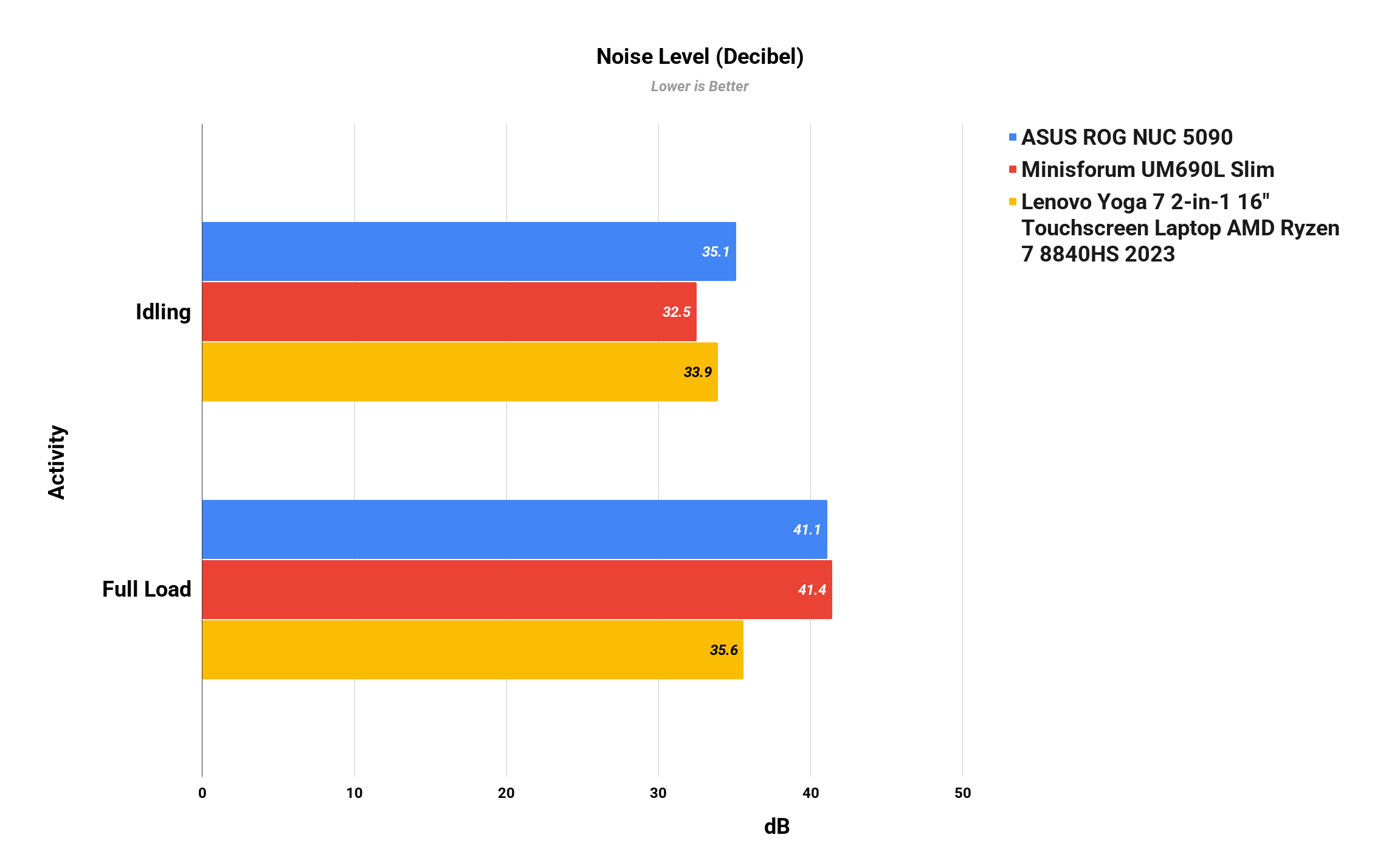
| Idle | Full load | |
|---|---|---|
| Power (wall) | 59.5W | 297.7W |
| Noise | 35.1 dB | 41.1 dB |
That power number is the real footnote: ~60W at idle is not low-power mini PC territory: it’s tiny-flagship-desktop territory. Fine for a daily driver; a poor choice for a 24/7 homelab. Noise, meanwhile, is genuinely composed for the heat being dumped.
Price, Availability & What to Watch For
- Price: $5,999 (ASUS US e-store). We’ve seen third-party listings at $7,299 and a Chinese 128GB config at CNY 51,999. Limited-edition availability means prices will swing by region.
- Memory confusion is real: ASUS marketing says “up to 128GB,” but the product page spec table for this SKU lists a 64GB ceiling, and our unit shipped with 64GB (63GB usable). Buyers are right to want this nailed down before spending six grand. Early community discussion is already calling this out.
- No rear audio jack.
- Dim RGB (brightness slider barely does anything).
- High idle power, see above.
- It’s a laptop GPU: the 175W RTX 5090 Laptop is phenomenal, but a full desktop 4090/5090 rig still beats it in sustained renders and raw raster.
Pros
- Top-tier gaming in a 3-liter chassis (389 fps Cyberpunk at 1080p RT)
- 24GB GDDR7, real local-AI and creator headroom
- PugetBench score within ~1% of a 4090 desktop
- Strong I/O: TB4, Wi-Fi 7, 2× DP 2.1, 2× HDMI 2.1
- Anniversary design actually looks special
Cons
- $5,999 starting price
- Confusing 128GB-vs-64GB memory messaging
- ~60W idle power, not a 24/7 box
- No rear audio out
- Uneven regional availability
The Verdict
The ROG NUC 16 Edition 20 is not a value buy. It’s a niche, ultra-premium machine for a very specific buyer: someone who wants genuinely extreme gaming and creator performance but refuses to put a tower under the desk. If that’s you (and the $5,999 doesn’t sting), this is one of the most interesting mini PCs money can buy.
If you just want the performance without the anniversary tax, a full-size desktop (or even a well-cooled 16-inch gaming laptop) will get you more per dollar. The ROG NUC 16 Edition 20 isn’t competing on value. It’s competing on “can they really do this?”, and they absolutely can.
Test unit: Core Ultra 9 290HX Plus, RTX 5090 Laptop 24GB, 64GB DDR5, 2TB PCIe 5.0 SSD. Windows 11. All benchmarks are our own runs; settings as noted.
— Tame That Tech Minion
Discussion