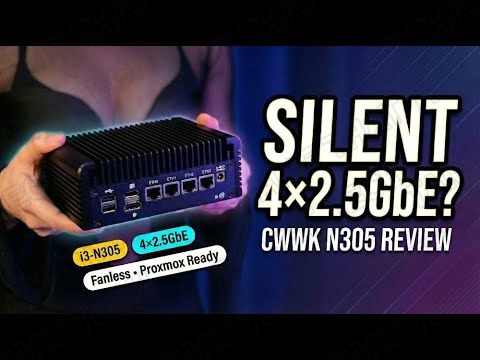
CWWK i3-N305 Review: Fanless 4x 2.5GbE Mini PC for Proxmox & Soft-Routers
Home labs and small offices don’t need a loud gaming rig: they need a compact, low-power box that routes traffic, runs a few VMs, and disappears into a shelf. The CWWK 12th-gen fanless mini PC with the Intel Core i3-N305 is built exactly for that: an 8-core Alder Lake-N CPU, four Intel 2.5GbE ports, DDR5, and NVMe expansion in a passively cooled aluminum chassis.
Short version: if you’re comfortable doing first-boot firmware updates, this is a very strong value for a multi-LAN mini server. Here’s the full picture from testing it as a home-lab node, soft-router, and lightweight NAS.
TL;DR: The 10-second verdict
| What it is | A fanless mini PC built around the Intel Core i3-N305 (8-core Alder Lake-N) with four 2.5GbE ports, DDR5, and M.2 expandability |
| Who it’s for | Homelabbers, network hobbyists, and small businesses running Proxmox, OPNsense, or pfSense-style firewalls |
| The headline | 4× Intel i226-V 2.5GbE, DDR5-4800, NVMe + M.2 Key-E expansion, silent passive cooling: an affordable multi-LAN appliance |
| The catch | Firmware maturity varies by SKU, documentation is thin, and USB/port config differs between listings: plan on BIOS/driver updates at first boot |
| Our take | A very strong value if you know what you’re buying: this is network/edge gear, not a desktop gaming machine |
| Where To Buy (Affiliate Links) | Amazon · Later · JoyLink |
| Video Review | YouTube |
Hardware & Specs
| Component | Specification |
|---|---|
| CPU | Intel Core i3-N305: 8 cores, 8 threads, Alder Lake-N (12th gen) |
| Memory | 1× SO-DIMM DDR5-4800, up to 32 GB |
| Storage | 1× M.2 NVMe (PCIe x4) + M.2 Key-E slot for Wi-Fi 6 modules |
| Networking | 4× Intel i226-V 2.5GbE (most SKUs) |
| Video out | HDMI 2.1 · DisplayPort 1.4 |
| Cooling | Fanless aluminum chassis (acts as heat spreader) + 2× optional 4-pin fan headers |
| Power | 12V DC in: optimized for low-power 24/7 operation |
The spec sheet is all about networking and efficiency. Four Intel 2.5GbE ports on a fanless box is exactly what a soft-router or firewall build needs, and the M.2 Key-E slot lets you add Wi-Fi 6 without sacrificing the NVMe bay. One thing to note: USB port types and counts differ between SKUs: double-check your specific listing before you buy.
Design, Build & Ports
The aluminum housing acts as a heat spreader, and the footprint is compact enough to sit on a shelf or mount behind a monitor. Out of the box the build feels solid, and the passive design gives a clean, quiet aesthetic, no fans, no noise.
On the rear panel you’ll usually find the four 2.5GbE ports, plus HDMI 2.1 and DisplayPort 1.4 for a local admin console. Inside, there’s the full-size M.2 NVMe slot, the Key-E slot, and the single SO-DIMM socket. If you’re planning Proxmox with multiple VMs, budget for at least 16 GB of DDR5: 8 GB gets tight fast.
Software & Setup
This unit is marketed for Proxmox, OPNsense, pfSense-style firewalls, and general Linux server use, and that’s exactly what it’s good at.
Two setup notes worth heeding:
- Update the BIOS and firmware immediately after first boot: some early units needed a firmware update to enable all NICs and fan headers. If a NIC doesn’t appear on first boot, check the BIOS version, update, and re-verify driver/kernel compatibility.
- Documentation is thin, some shipments have sparse paper docs, so plan to download BIOS and driver files online.
Performance
This is a network appliance, so the benchmarks that matter are network and storage oriented:
- Networking: with current kernel drivers and offloads enabled, the i3-N305 handles typical multi-LAN and NAT workloads close to line rate for 2.5GbE links (verified with iperf3 single- and multi-stream tests).
- Storage: fio sequential and random tests on NVMe confirm sustained throughput under load, plenty for a lightweight NAS.
- Virtualization: in Proxmox, a few lightweight VMs and containers running routing and DNS services stayed stable at small-to-medium concurrency.
Don’t expect a desktop gaming machine or a heavy content-creation workstation. This is tuned for network and edge roles, and it’s very good at those.
Thermals & Noise
The passively cooled design is silent under normal soft-routing and light VM loads. Under sustained heavy CPU or NVMe I/O, the unit benefits from adding a small 40mm fan to one of the headers for extra thermal headroom, the headers are there for exactly that. If you plan permanent heavy compute or sustained NVMe writes, plan an active cooling approach to keep junction temps lower long-term.
Price & Availability
CWWK sells this class of fanless multi-LAN mini PC at a very competitive price, the price-to-feature ratio (multi-2.5GbE + DDR5 + M.2 expandability) is the community’s biggest praise point. Check current listings for your region, and confirm the port layout matches what you need before ordering.
Pros
- Excellent multi-LAN feature set: four Intel 2.5GbE ports
- DDR5 memory support and NVMe expandability
- Silent, fanless aluminum chassis
- Proxmox / OPNsense / pfSense ready out of the box
- Low-power 24/7 operation
Cons
- Firmware maturity varies, early units needed updates for full NIC support
- Thin documentation and inconsistent SKU port configs
- Not a gaming/desktop machine, network and edge roles only
The bottom line
For a low-cost multi-LAN mini server that’s Proxmox-ready, the CWWK i3-N305 is a very strong value. If you’re comfortable doing first-boot updates and know you’re buying network gear, not a workstation. Quiet, cool, four 2.5GbE ports, and DDR5 in a box that disappears into the rack.
— Tame That Tech Minion
Discussion